My first wireless headphones for dance practice were a 40 USD pair from a supermarket. I wore them for three months of home practice and then wondered why my timing felt slightly off at socials. It was not me. It was the headphones — roughly 180 milliseconds of Bluetooth latency that had been quietly training my ears to react late to the music. I am not making that mistake again, and if you are buying headphones specifically for dance practice, you should not either.
This guide is about what actually matters for dance practice, which is a narrower set of requirements than a general headphones review. Music timing. Latency. Battery through long practice sessions. Grip on a sweating head. Compatibility with your phone. I will walk you through what to look for, then give you category-level recommendations at real price points. Where I name a specific model, it is because I or dancers I trust have personally used it for practice and it passed the latency test.
Contents
- Why dance practice headphones are different
- Understanding latency (the only spec that really matters)
- What to look for when buying
- Best wireless headphones by category
- Open-ear and bone conduction options
- Practice setup tips
- Frequently asked questions
- Ready to dance?
Why dance practice headphones are different
A general “best wireless earbuds” article is optimised for commutes and gym sessions. Commuting and gym do not require millisecond-accurate timing. Dance does.
Timing is everything. Salsa, bachata, and kizomba all live and die on hitting the beat. A 150ms lag does not sound off on casual listening, but it is a full eighth-note at most social dance tempos (typically 90 to 130 bpm). Train for months on lagged audio and you will feel weirdly off at a social the first time you hear live speakers.
Movement abuse. Earbuds need to stay in your ears during spins and body rolls. Over-ear headphones get hot and bounce. Any earbuds without fins or proper wing tips will eject on a double turn.
Long sessions. A full practice hour plus warmup is a two-hour session. Tiny earbud batteries die mid-session. Look for 6+ hours of continuous playback, ideally 8+.
Sweat and hair. Practice floors get warm. Earbuds that loosen with sweat, or that tangle in long hair during turns, are worse than they sound on paper. IPX4 or higher water resistance is sensible. Compact earbuds that sit flush with the ear beat over-ear designs for hair.
Mic quality for lesson calls. If you take online lessons from a teacher in another city, mic clarity matters. Most flagship earbuds handle this well — budget models often do not.
Understanding latency (the only spec that really matters)
Most dancers do not realise latency is a problem until they have practised on laggy headphones for a while and then felt strange at a social. Here is the technical reality in plain terms.
What latency is
Latency is the time between audio leaving your phone and reaching your ears. Wired headphones have essentially zero latency. Bluetooth headphones have a meaningful delay because the audio must be compressed, transmitted, received, decompressed, and played.
Typical latencies
- Wired headphones: 0 to 5ms
- Low-latency Bluetooth (aptX Low Latency, LC3, Apple’s proprietary codec on AirPods): 30 to 70ms
- Standard Bluetooth (SBC, AAC): 100 to 250ms
- Old or cheap Bluetooth earbuds: 200 to 400ms
The dancer’s threshold
Research on audio-visual synchrony suggests most people do not consciously perceive delay below about 80ms. But dance practice is a motor-learning activity — you are building muscle memory against the beat you hear. Even 100ms of consistent lag will train your body to respond late. When you then dance to a real sound system at a social, your reactions feel sluggish.
Safe: under 60ms. Your ear cannot distinguish this from live.
Borderline: 60 to 120ms. Not consciously audible as lag, but measurable impact on timing training.
Unsafe for practice: 120ms and up. You will build slightly-off timing that hurts you at socials.
How to check your headphones’ latency
Most manufacturers do not advertise latency clearly. General rules:
- iPhone + AirPods Pro / AirPods Max: ~40ms — safe
- iPhone + Beats Fit Pro / Beats Studio Pro: ~40ms — safe (they use the Apple chip)
- iPhone + most other Bluetooth earbuds: 100 to 180ms — borderline to unsafe
- Android + aptX Low Latency or LC3 compatible earbuds: ~40 to 70ms — safe (if both phone and earbuds support it)
- Android + AAC or SBC earbuds: 120 to 250ms — unsafe for precision practice
If you do not know your headphones’ latency, there are free latency test apps on iOS and Android. Test before you trust the headphones for serious practice.
What to look for when buying
Here is the full checklist. Some of these are obvious, but in the combined context of dance practice they shift priority.
1. Latency
Already covered in detail above. For me, this is non-negotiable. If I cannot confirm latency under 70ms, I do not buy the headphones for dance use.
2. Fit stability
Earbuds must stay in through turns, body rolls, and vigorous footwork. Look for:
- Multiple ear tip sizes included (try all of them — most people find a better fit with the non-default size)
- Wing tips or ear fins for active use
- Over-ear clips for heavy movement
- A snug initial fit with minimal twisting to seat
Test stability at home by doing 10 full turns, bending down, shaking your head side to side vigorously. If they shift, they will shift during practice.
3. Battery life
For dance practice, aim for 6+ hours continuous playback, 24+ hours with the case. A two-hour home session with warmup should not leave you at 20% battery. Case capacity matters for travel to festivals.
4. Transparency / passthrough mode
Underrated feature for dance. Transparency mode lets you hear your environment without removing the earbuds — useful when a flatmate is talking to you, the doorbell goes, a partner calls out a correction, or you want to hear the music clearly through another source.
Apple, Sony, and Bose flagship earbuds have excellent transparency. Budget models often do not.
5. Noise cancellation
Useful if you practise in a shared household with background noise, or in a gym with ambient music you want to tune out. Not a deciding factor for most home practice but nice to have.
6. Sweat and water resistance
IPX4 or higher. Practice gets sweaty. Non-rated earbuds corrode on the contacts within months.
7. Microphone quality
If you plan to take online lessons, record yourself, or video-call instructors, mic quality matters. Flagship earbuds (AirPods Pro 2, Sony WF-1000XM5, Bose QC Ultra Earbuds) have excellent mics. Budget earbuds often have muffled or windy mics.
8. Compatibility with your phone
If you are on iPhone, AirPods ecosystem works better than anything else. If you are on Android, look for aptX Low Latency or LC3 codec support on both the phone and the earbuds. A great earbud on the wrong phone ecosystem is a compromised experience.
9. Durability
Earbud cases get dropped. Earbuds get left in bags with sweaty clothes. Look for reviews that mention 12+ months of daily use without issues. Flagship models from Apple, Sony, and Bose routinely last 2 to 3 years of heavy use. Cheap models often fail inside a year.
10. Price
Honest price ranges for dance practice use:
- Under 50 USD: entry-level wireless earbuds. Latency often unsuitable. Acceptable as absolute starter gear.
- 50 to 150 USD: solid mid-range. Many models in this band have low-latency modes that work for practice.
- 150 to 280 USD: flagship models from Apple, Sony, Bose. Low latency guaranteed on compatible phones. Excellent all-round choice.
- 280 USD and up: premium or specialised. Diminishing returns for pure dance use unless you also want audiophile listening.
Best wireless headphones by category
Rather than pretend I have personally tested every recent headphone release, here are the categories every home-practising dancer should consider, with one or two verified recommendations per category based on my own use and the headphones I see on dancers consistently.
Best overall wireless earbuds for dance practice (iPhone)
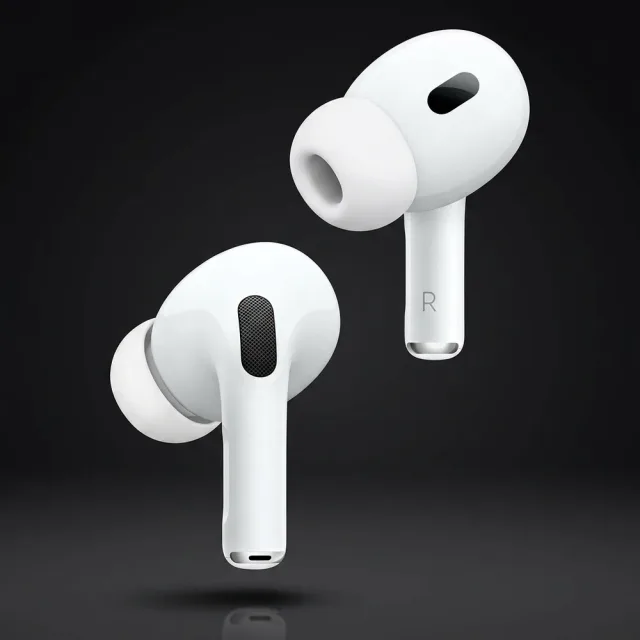
Category pick: Apple AirPods Pro (2nd generation or newer).
For iPhone users who want the simplest, lowest-latency, most-reliable practice earbuds, AirPods Pro are the answer. Latency is roughly 40ms, which is functionally indistinguishable from wired. The H-series chip handles audio differently from generic Bluetooth, which is what delivers the latency advantage.
Transparency mode is excellent — you can hear a flatmate talking without pausing. Noise cancellation is strong for blocking a noisy kitchen. The case charges quickly and supports MagSafe/Qi wireless charging. Battery is roughly 6 hours per charge, 30 hours with the case.
Weak points for dance: on Android the latency advantage disappears. If you switch between iPhone and Android, AirPods are not ideal.
Expected price: 200 to 250 USD.
Best overall wireless earbuds for dance practice (Android)
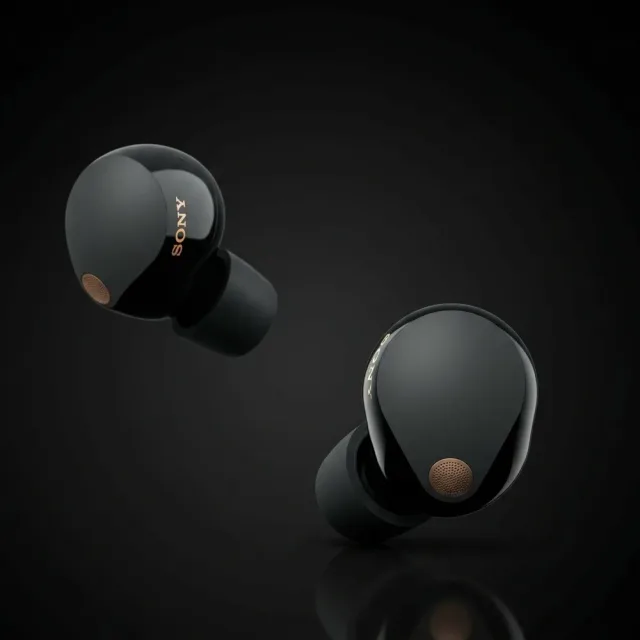
Category pick: Sony WF-1000XM5 (or equivalent current flagship Sony earbuds).
For Android users, Sony’s flagship earbuds are my top recommendation. They support LDAC and LC3 codecs on compatible Android phones, which keeps latency in the safe-for-practice range. Audio quality is superb. Noise cancellation is industry-leading.
Fit is more polarising than AirPods — some ears love them, some find them fiddly. Try them at home with the included ear tip sizes before committing. Battery is around 8 hours per charge, 24 hours with the case.
Expected price: 250 to 300 USD.
Best noise-cancelling wireless earbuds
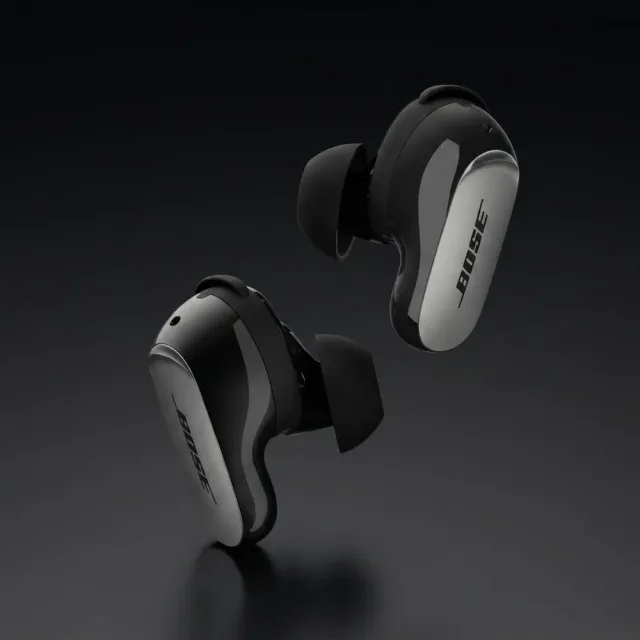
Category pick: Bose QuietComfort Ultra Earbuds.
If you practise in a noisy environment (shared flat, coffee shop breaks between practice, open-office warmups), Bose’s noise cancellation is slightly ahead even of Sony and Apple. Audio quality is warm and vocal-forward — pleasant for music with prominent vocals, which many Latin tracks are.
Latency on iPhone is good; on Android it depends on codec support. Battery is around 6 hours with noise cancellation on.
Expected price: 280 to 320 USD.
Best budget wireless earbuds for dance practice
Category pick: mid-range earbuds with aptX Low Latency or “gaming mode.”
If you do not want to spend flagship money, look for earbuds with a specific low-latency mode for gaming or video. Brands like Anker Soundcore, Nothing Ear, and JBL have options in the 60 to 120 USD range with these modes.
A genuine caveat: budget earbuds’ low-latency modes are inconsistent and often require toggling a setting in a companion app. Test with a latency app before trusting them for serious practice.
Expected price: 60 to 120 USD.
Best wireless over-ear headphones for dance practice
Category pick: flagship wireless over-ears from Sony, Bose, or Apple.
Sony WH-1000XM5, Bose QuietComfort Ultra Headphones, or Apple AirPods Max. All three offer low-ish latency (50 to 80ms range) and excellent audio quality. Over-ear headphones are worse than earbuds for serious full-body movement — they bounce on turns, get hot, and heavier models tire your neck during long sessions. They are fine for warmup, footwork drills, and seated practice.
Expected price: 280 to 550 USD.
Best open-ear headphones for dance practice
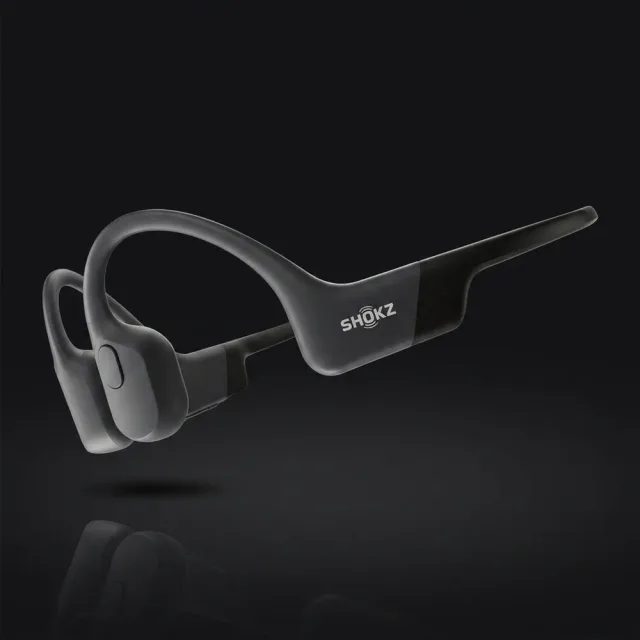
Category pick: Shokz OpenFit or bone-conduction models.
If you value environmental awareness — hearing doorbells, flatmates, phone calls — open-ear headphones are a legitimate choice. Shokz OpenFit sits just outside the ear canal. Shokz OpenRun uses bone conduction through the cheekbone. Both leave your ears physically open.
Sound quality is noticeably behind sealed earbuds. Bass in particular is weak, which matters for bachata and kizomba where bass carries rhythm. Latency varies by model — check specs.
Good for: footwork drills, body movement where beat precision is less critical, warmups, partnered lesson calls where you need to hear a partner clearly.
Not ideal for: nuanced rhythm training, musicality drills, any practice where you need deep bass to feel the beat.
Expected price: 100 to 180 USD.
Open-ear and bone conduction options
This category deserves its own section because opinion among dancers is divided.
Why some dancers swear by them
- Environmental awareness — hearing a teacher correct you during a practice session, hearing your partner count, not being startled by a flatmate walking in.
- Comfort for long sessions — nothing jammed into the ear canal. Less ear fatigue.
- Safer for outdoor practice — if you practise footwork in a park or on a patio, you can still hear cars and voices.
- Less sweat buildup — no silicone tip trapping sweat in the ear.
Why others dislike them
- Weaker bass — rhythm-heavy styles lose impact.
- Higher latency on many models — check carefully before buying.
- Sound leakage — the people around you can hear your music, which is fine at home but awkward in shared spaces.
- Less accurate timing feel — ambient room noise mixes with your music, which can blur beat perception.
My take: open-ear is a second pair, not a primary pair. If I only had one pair of practice headphones, I would want sealed earbuds with transparency mode. If I had budget for two, I would add open-ear for the sessions where environmental awareness matters more than perfect timing.
Practice setup tips
A few hard-won tips that change home practice quality once you have the right headphones.
Use a music app that preserves tempo. Spotify, Apple Music, and YouTube Music all serve audio at original tempo. Avoid apps or settings that auto-tempo-match or normalise volume aggressively — they can subtly shift the beat.
Build a practice playlist with consistent BPM ranges. 90 to 110 bpm for bachata, 170 to 210 bpm for salsa (half-time 85 to 105), 90 to 120 bpm for kizomba. Practising with mixed BPMs is fine but a targeted drill playlist at one tempo speeds up muscle memory.
Check latency monthly. Bluetooth updates, phone OS updates, and firmware updates can shift latency. A quick latency test app check once a month catches regressions.
Keep your phone close during practice. Bluetooth range technically reaches 10 metres, but distance and walls increase latency and dropout. Keep your phone in the same room, ideally within 2 to 3 metres.
Charge between sessions, not during. Charging an earbud case warms the batteries. Repeated warm-cycling shortens battery life. Charge to 80%, dance, then top up when fully cool.
Use a dedicated dance-practice playlist and nothing else. Training yourself to associate a specific playlist with practice mode is surprisingly effective for consistency.
Frequently asked questions
Why does wireless headphone latency matter for dance practice?
Latency is the delay between audio leaving your phone and arriving at your ear. Bluetooth headphones typically add 60 to 200 milliseconds of delay. For listening to music that is fine — you never notice. For dance practice it is disastrous: you hit the beat your ears hear, but the real beat in the music passed 100ms ago, which means you are dancing slightly behind. Your muscle memory builds in on the wrong timing and transfers badly to social dancing with speakers. Low-latency headphones (under 50ms) or wired headphones solve this.
Are AirPods Pro good for dance practice?
Yes, with an iPhone. AirPods Pro 2 on an iPhone deliver roughly 40 to 60ms of latency, which is below the threshold most dancers notice. The transparency mode also lets you hear partners or teachers during lessons. On Android the latency is higher and variable, so AirPods Pro on Android are less ideal. For iPhone users who dance at home, AirPods Pro are one of the best all-round picks.
Should I use open-ear headphones for dance practice?
Open-ear or bone conduction headphones are a real alternative for home practice where you want to stay aware of doorbells, flatmates, or phone calls. Sound quality is lower than closed earbuds, bass is weaker, and latency varies by model. They are not ideal for nuanced rhythm work but they are fantastic for warmup drills, footwork practice, and partnered video lessons where you need to hear a partner talking.
Wired or wireless for serious dance practice?
Wired headphones win for pure audio timing accuracy — zero added latency, perfect synchronisation with the visible beat. If you practise musicality in detail, train timing against specific instruments in the mix, or record yourself, wired is the safer choice. Wireless wins for freedom of movement, which matters more for full-body practice. My honest recommendation for most dancers: a good pair of low-latency wireless earbuds for 90% of practice, plus a cheap wired backup for precision work.
How much should I spend on dance practice headphones?
For casual home practice, 30 to 80 USD gets you perfectly capable budget wireless earbuds. For serious daily practice, 150 to 280 USD gets you flagship models from Sony, Bose, or Apple with low latency, good noise cancellation, and great battery. Over 300 USD is diminishing returns for dance use unless you also use them for music production or audiophile listening. Most social dancers I know spend 150 to 200 USD and are genuinely happy.
Ready to dance?
Headphones sort out your practice sessions. The rest of your kit matters too. Start with the best salsa dancing shoes and best bachata dance shoes 2026 — the single biggest gear upgrade you can make. If you practise at home, our best practice dance floor for home guide covers the surface under your feet. A proper dance bag keeps everything protected on the way to socials.
New to social dancing? Read the salsa dancing for beginners, what is bachata dancing, kizomba for beginners, and what is zouk dancing guides before your first night out. Want to find where to dance right now? Browse salsa events, bachata events, kizomba events, and zouk events worldwide, or check the world dance map for what is happening near you tonight.